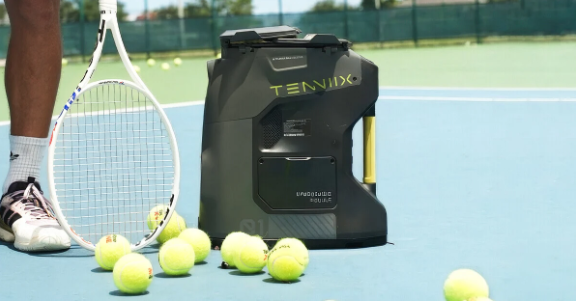
Every tennis family knows the weekend dilemma: one parent wants to grind deep baseline rallies, a teenager needs to sharpen her backhand, and the youngest just wants to make clean contact without chasing balls into the fence.
A family tennis ball machine solves exactly that problem. One machine at the baseline can feed gentle lobs to a nine-year-old, steady crosscourt balls to a developing junior, and heavy topspin to a competitive league player. You don’t need three machines — you need to know how to switch settings quickly so every family member gets a session built for their level.
Why One Machine Works for a Whole Family
The economics are straightforward: three players taking regular private lessons costs more in a few months than a quality ball machine costs once. But the real win is logistical. The family heads to the court together instead of coordinating three separate practice times.
The machine never gets tired, never cancels, and never judges a double fault. It simply needs someone to change the settings between turns — a changeover that takes less time than fetching a water bottle.
The Three Levels Under One Roof
Most tennis families break down into the same three archetypes. Here’s what each one actually needs from the machine.
Level 1: The Beginner
Beginners need time — time to watch the ball, set their feet, and swing without panic. That means a slow feed rate (one ball every 6–8 seconds), low speed (30–40 mph), and predictable placement near the service line. A soft topspin setting helps: the ball dips and bounces predictably instead of skidding through.
The goal at this stage is contact. Every clean hit builds muscle memory, so keep sessions short — ten to fifteen minutes — and always finish on a high note before frustration creeps in.
Level 2: The Developing Junior
The intermediate player has strokes but not consistency. This is where oscillation earns its keep: medium ball speed (45–55 mph), a moderate feed rate, and a two-line or random pattern that forces split-steps, recovery, and proper setup on every shot — the habits that actually transfer to matches.
Variety matters most here. Alternate five-minute blocks — crosscourt forehands, then backhands, then short approach balls. The settings change between blocks takes seconds and keeps a teenager engaged far better than flat, repetitive feeding.
Level 3: The Competitive Adult
Advanced players use the machine as a sparring partner for specific weapons: higher speeds (60–80 mph), heavy topspin, deep corner-to-corner oscillation, short angles, and the occasional lob for overhead practice. Tighter feed intervals keep the heart rate up and force faster recovery.
Many competitive parents also use it for serve-return practice — fast flat feeds to one corner, returning deep under pressure. Ten focused minutes before a league match beats an hour of casual hitting.
Switching Settings in Under a Minute
The worry that stops most families is complexity: nobody wants to spend half the session fiddling with dials. In reality, switching between three saved profiles takes less than sixty seconds.
Save a Preset for Each Player
Programmable machines let you store a named setting per family member — “Emma – Beginner,” “Jake – Junior,” “Dad – Advanced” — making the switch a single button press. If your machine lacks memory presets, write the three combinations on a laminated card taped to the hopper: speed, spin, feed rate, oscillation, and elevation for each person.
Make the Changeover a Family Drill
When Emma finishes, she walks to the machine while Jake stretches at the baseline. She presses one button (or dials in the four settings from the card), and Jake is hitting within a minute. Kids genuinely enjoy operating the machine — it gives them ownership of the session instead of making them passive participants.
Getting comfortable with the full range of tennis ball machine settings pays off fast. Once you understand how spin, elevation, and oscillation interact, each preset can be tuned precisely — the beginner’s ball lands shorter and softer, the advanced player’s kicks higher and heavier — with no guesswork at the court.
A Sample One-Hour Family Session
Minutes 0–15: Beginner block. The youngest hits service-line feeds while the others warm up. The middle player keeps the hopper filled.
Minutes 15–35: Junior block. Switch to the intermediate preset for two-line drills while a parent picks up balls and offers feedback. The beginner takes a water break — short sessions protect young arms and attention spans.
Minutes 35–55: Advanced block. The competitive player dials up speed and spin for deep rally drills or serve-return practice. The rested kids collect balls and watch.
Minutes 55–60: Family game. Finish together with gentle feeds while everyone takes turns hitting targets. End the session laughing, not exhausted.
Choosing a Machine That Grows With Your Family
Not every machine covers the full spread from beginner to advanced. Look for these family-friendly features:
- Wide speed range — roughly 20 to 80 mph covers everyone from a young child to a 4.5-level adult.
- Programmable presets or memory modes — one-button switching is what makes the whole plan work.
- Random and two-line oscillation — essential for intermediate and advanced players; gentle fixed feeds are enough for beginners.
- Adjustable feed rate and elevation — slow, high feeds for kids; fast, flat feeds for adults.
- Ball capacity and battery life — at least 100 balls and 2+ hours of runtime so three sessions fit in one outing.
Buy for where your family is going, not just where it is. The beginner preset your youngest uses today is a machine the family can keep using for a decade as everyone’s level rises.
One Court, One Machine, Three Happy Players
A tennis ball machine isn’t really a purchase for one player — it’s infrastructure for the whole household. When every family member has a saved setting and the changeover takes less than a minute, practice stops being a scheduling problem and becomes something the family does together. The kid who once needed lobs at the service line will be stealing your intermediate preset within a season. And that’s the point: the machine grows with them, one button press at a time.
